Use this daily hotel reception checklist before departures and arrivals to check rooms, payments, documents, guest requests and unfinished work. It is designed for small hotels, villas and apartments where a lean team handles several tasks at once.
One guest wants early check-in. Another needs an invoice. Housekeeping has not confirmed room 204. A driver is waiting outside. A late checkout affects the next arrival.
Prepare the records before guests reach the desk. Missing room updates, unclear charges and unanswered requests otherwise become problems to resolve during check-in or checkout.
A daily reception checklist protects the busiest hours of the day
During changeover, reception handles departing and arriving guests while housekeeping changes room status. Payments, documents, keys, messages and special requests all need attention in the same period.
Use the checklist to decide what needs action now, what can wait and what requires manager approval.
The 9-part daily hotel reception checklist
Review the nine areas below before the first departure and again before the first arrival. The same routine can be used by small hotels, boutique properties, villas, apartments and seasonal teams.
| Checklist area | What reception should check | Why it matters |
|---|---|---|
| Today’s departures | Checkout time, open balance, invoice, extras, luggage, transport | Prevents billing and timing problems |
| Today’s arrivals | Guest name, arrival time, room, payment, requests, documents | Keeps check-in faster and clearer |
| Room status | Clean, dirty, inspected, blocked, out of service, late checkout | Aligns reception and housekeeping |
| Guest documents | ID, passport, registration data, missing details | Avoids delays during check-in |
| Payments and folios | Deposits, open balances, refunds, company invoices, city tax | Reduces checkout conflict |
| Special requests | Baby cot, transfer, parking, room preference, late checkout | Protects guest promises |
| Guest messages | WhatsApp, email, OTA messages, calls, urgent replies | Stops requests from getting buried |
| Tasks and maintenance | Repairs, blocked rooms, housekeeping notes, manager approvals | Keeps daily work visible |
| Shift handover | Unfinished items, risks, guest context, next actions | Gives the next shift control |
Start the day with departures
Start with departures: checkout times determine when housekeeping can begin and which rooms can be prepared for arriving guests. Check payment and invoice details at the same time.
For each departure, review:
- Guest name and room number
- Planned checkout time
- Open balance
- Deposit or refund status
- Invoice request
- Extra charges
- Luggage storage
- Transfer or taxi request
- Room inspection process
- Late checkout approval
Confirm open balances before checkout
Before checkout, review open balances, unpaid extras, deposits, refunds, card issues, company billing, invoice details, city tax and payment notes. Staff should handle financial corrections and approvals through the property’s authorized process.
Record the amount and the next action rather than a vague payment warning.
Weak note: “Guest has payment issue.”
Better note: “Room 305 has open balance of €64 for minibar and transfer. Guest requested company invoice. Confirm company details before checkout.”
Prepare invoices before guests ask
Identify guests who need personal or company invoices, split payments or tax details before departure. Business guests and group bookings may need extra preparation.
Check the following invoice details:
| Invoice item | Check before departure |
|---|---|
| Guest name | Correct spelling |
| Company details | Name, address, tax number |
| Room charges | Nights, rate, discounts |
| Extras | Breakfast, minibar, parking, transfer |
| Payment method | Card, cash, bank transfer, OTA |
| Tax or city fee | Correct amount |
| Where to send the invoice |
Review arrivals before rooms are assigned
Review the arrival list before assigning rooms. Reception needs the expected arrival time, reservation details and a confirmed room status.
Check:
- Guest name
- Booking source
- Arrival time
- Room or unit assigned
- Number of guests
- Documents needed
- Payment status
- Special requests
- Parking needs
- Transfer notes
- Late arrival instructions
- Guest message history
Match arrivals with real room status
Compare the reservation with the current room-status record and housekeeping’s update. A room marked “clean” still needs inspection before release.
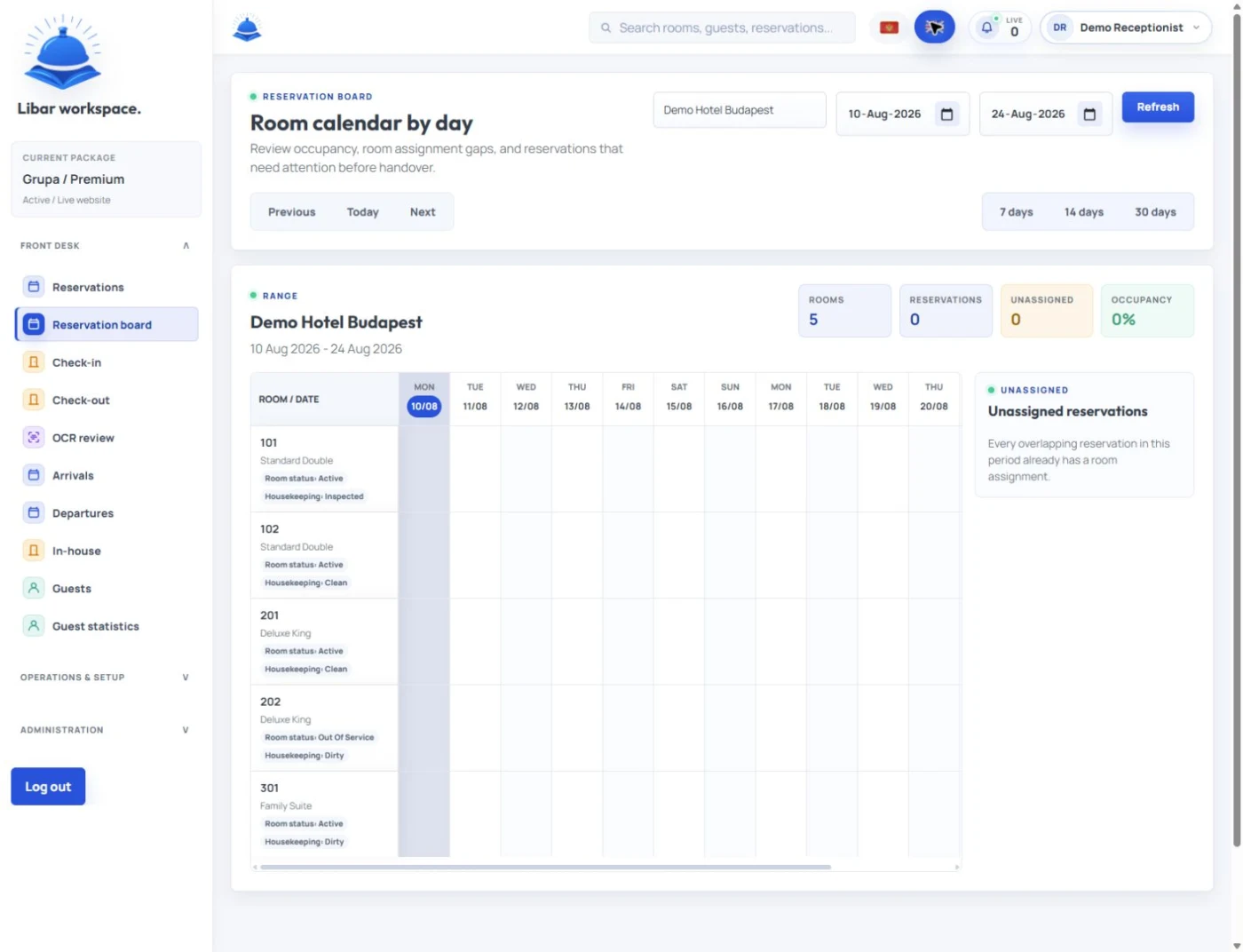
Use clear status labels.
| Room status | Meaning |
|---|---|
| Dirty | Guest departed, room not cleaned |
| Cleaning | Housekeeping is working |
| Clean | Room cleaned but not inspected |
| Inspected | Room checked and ready for guest |
| Occupied | Guest still in room |
| Late checkout | Guest approved to leave later |
| Blocked | Room held for internal reason |
| Out of service | Room cannot be sold |
| Maintenance pending | Room needs repair check |
Use “inspected” when the room has been checked and is ready for the guest. Apply the release rule below before handing over the key.
Handle early check-in with a clear rule
Confirm readiness before promising early access.
Early check-in is possible only when the room is inspected, assigned, and approved for release.
If the room is not ready, offer luggage storage, parking information or local recommendations, and give a realistic time for an update.
Example note:
“Room 112 requested early check-in. Room cleaning in progress. Inspection expected by 13:00. Guest waiting in lobby. Offer luggage storage and notify when inspected.”
Confirm late checkout before it affects the next arrival
Review the next reservation and housekeeping’s schedule before approving a late checkout. The decision affects room assignment and staff planning.
Reception should check:
- Guest room number
- Requested checkout time
- Next booking arrival time
- Housekeeping schedule
- Extra fee
- Manager approval
- Guest confirmation
A good note looks like this:
“Room 204 requested late checkout until 13:00. Next arrival expected at 16:00. Housekeeping can clean by 14:30. Manager approved €20 fee.”
Track special requests before the guest arrives
Review special requests in the message history before arrival and assign the work to a named person.
Common arrival requests include:
- Baby cot
- Extra towels
- Parking place
- Airport transfer
- Room preference
- Early check-in
- Late arrival
- Dietary note
- Accessibility need
- Local recommendation
- Celebration setup
Record the guest, room, required action, responsible person and current status.
Example:
“Room 108 requested baby cot. Housekeeping assigned. Place before 14:00. Reception to confirm before guest arrival.”
Guest messages need a daily review
Review WhatsApp, email, OTA messages, phone notes and internal comments before departures and arrivals.
A parking question may need only a reply. Late checkout needs a room-planning decision; a cot needs housekeeping work; an invoice request needs billing follow-up.
GuestNesty handles guest communication. Staff decide which messages need operational action and record that work in the reception process; do not assume a message has automatically created a task or changed a reservation.
Libar supports guest notes, tasks, room status, handovers, folios, invoices and daily reception work. Staff remain responsible for approvals, execution and confirming completion.
Documents should not slow down check-in
Before the arrival period, check which documents and registration details are missing and which property or local reporting requirements apply.
Check:
- Which guests still need ID or passport
- Which reservations need full guest registration
- Which guests arrive through OTA channels
- Which guests may arrive late
- Which documents or data need manager review
- Which local reporting rules apply to the property
Keep the guest-facing message simple:
“Please bring a valid ID or passport for registration at check-in.”
Explain any remaining registration details at reception.
Create a clean arrival desk setup
Before arrivals, prepare:
- Key cards or keys
- Printed forms if needed
- Payment terminal
- Invoice access
- Room assignment list
- Arrival notes
- Parking information
- Wi-Fi details
- Local recommendation sheet
- Emergency contact information
Use a simple arrival checklist for each guest
Use these ten steps for each arrival.
| Step | Reception action |
|---|---|
| 1 | Welcome guest and confirm name |
| 2 | Check reservation and room assignment |
| 3 | Confirm room status is inspected |
| 4 | Collect or confirm documents |
| 5 | Confirm payment or deposit |
| 6 | Review special requests |
| 7 | Explain breakfast, Wi-Fi, parking, and checkout |
| 8 | Give key or access instruction |
| 9 | Mark guest as checked in |
| 10 | Add any new guest note or task |
Use the same sequence when training new reception staff.
Use a simple departure checklist for each guest
Use these ten steps for each departure.
| Step | Reception action |
|---|---|
| 1 | Confirm room number and guest name |
| 2 | Review open balance |
| 3 | Confirm extras and city tax |
| 4 | Prepare invoice or receipt |
| 5 | Take payment if needed |
| 6 | Ask about stay feedback |
| 7 | Confirm luggage or transfer request |
| 8 | Mark guest as checked out |
| 9 | Notify housekeeping |
| 10 | Add follow-up note if needed |
Keep housekeeping updates close to reception
Reception needs housekeeping updates as work progresses so it can plan arrivals against current room readiness.
Set clear update moments:
- After first departures
- When cleaning starts
- When cleaning finishes
- After inspection
- When maintenance blocks a room
- When a room becomes ready
- Before early check-in approval
- Before final arrival wave
Record each change where reception and housekeeping can both check it.
Maintenance issues must affect room planning immediately
Include maintenance in room planning. An AC fault, water issue, lock problem, smell, noise or damaged item may require the room to remain blocked until checked.
Track:
- Room number
- Issue
- Time reported
- Who reported it
- Owner
- Urgency
- Can the room be sold
- Next inspection time
- Final status
Do not assign a room with an unresolved issue unless a manager approves it.
The manager should review the risk list daily
The manager should review the following risks each day and address items reception cannot resolve within its authority.
The risk list includes:
- Rooms not ready close to arrival time
- Guests with complaints
- VIP or repeat guests
- Open balances
- Refunds
- Late checkout conflicts
- Maintenance blocks
- Missing documents
- Unanswered guest messages
- Staff handover gaps
Paper checklists work until the pace gets too fast
Paper checklists can support staff training and straightforward days, but someone must update every copy when plans change.
A housekeeping status change can leave a paper list out of date. A WhatsApp request may be missed at handover, and a late-checkout approval made elsewhere may not reach reception.
Consider a digital reception workflow when more rooms, staff, higher occupancy or a larger volume of guest messages make those updates difficult to follow.
Small hotels need practical software, not complexity
Choose software against the daily work the team must complete:
- Arrivals
- Departures
- Room status
- Guest notes
- Tasks
- Payments
- Folios
- Invoices
- Maintenance
- Handover
- Reports
Libar helps reception and property teams manage daily operations, including the records and tasks listed above. Check that staff can find and update the information during a busy shift.
Montenegro and seasonal hotels need tighter daily routines
Seasonal hotels on the Adriatic coast may face early departures, late checkouts, airport transfers, multilingual guests and short room-turnaround times on the same day.
For lean teams in Montenegro’s small hotels, villas and apartments, include owner updates, local recommendations and payment notes alongside check-in, checkout and guest messages.
Daily reception checklist template
Complete the relevant fields at the start of the day and update them as plans change.
Date and shift
Date:
Receptionist:
Manager on duty:
Housekeeping lead:
Expected arrivals:
Expected departures:
Occupancy today:
Departures
Room:
Guest name:
Checkout time:
Open balance:
Invoice needed:
Extras to confirm:
Luggage or transfer:
Room inspection status:
Follow-up:
Arrivals
Room:
Guest name:
Arrival time:
Booking source:
Payment status:
Documents needed:
Special request:
Parking note:
Room status:
Check-in note:
Room status
Room:
Current status:
Housekeeping owner:
Inspection needed:
Maintenance issue:
Ready time:
Blocked: yes/no
Guest requests
Guest/room:
Request:
Owner:
Deadline:
Status:
Manager approval needed: yes/no
Payments and invoices
Guest/room:
Open balance:
Deposit:
Refund:
Invoice type:
Company details:
Payment note:
Messages
Guest/room:
Channel:
Message summary:
Action needed:
Owner:
Status:
Handover notes
Unfinished item:
Guest risk:
Room risk:
Payment risk:
Manager note:
Next action:
Example daily reception note
Date: 22 July
Expected departures: 14
Expected arrivals: 18
Manager: Jelena
Housekeeping lead: Ana
Room 204 requested late checkout until 13:00. Next arrival expected at 16:00. Housekeeping can clean by 14:30. Manager approved €20 fee.
Room 108 arrival at 15:00 requested baby cot and parking. Housekeeping assigned baby cot. Reception to confirm parking space before 13:00.
Room 302 has open balance of €84 for transfer. Guest asked for company invoice. Confirm company details before checkout.
Room 305 has AC noise reported. Maintenance will test after 12:00. Keep room blocked until final status.
Use the checklist daily and review it after busy periods. Carry unfinished work into the next shift’s handover. If paper no longer keeps up, assess Libar against the arrivals, departures, room status, tasks, guest notes, folios and invoices your team needs to manage.