Daily Hotel Reception Checklist for Smooth Arrivals and Departures
A daily hotel reception checklist helps front desk teams manage arrivals, departures, room status, payments, guest requests, documents, and handovers in one clear routine. For small hotels, villas, and apartments, it reduces missed details during busy changeover hours and keeps the guest journey under control.
Reception pressure builds quietly.
Then it hits at once.
One guest wants early check-in. Another needs an invoice. Housekeeping has not confirmed room 204. A driver is waiting outside. A late checkout affects the next arrival.
Without a daily checklist, reception starts reacting instead of managing. That creates slow service, repeated questions, billing mistakes, and avoidable stress for the whole team.
A daily reception checklist protects the busiest hours of the day
Arrivals and departures create the most operational risk in a hotel. The same desk must handle guests leaving, guests arriving, rooms changing status, payments, documents, keys, messages, and special requests.
That overlap needs structure.
Not more memory.
A good checklist gives the team one rhythm before, during, and after changeover. It helps reception see what must happen now, what can wait, and what needs manager approval.
Small hotels feel this even more because fewer people cover more tasks. One receptionist may manage check-in, checkout, guest messages, housekeeping updates, local questions, payments, and handover notes in the same hour.
The 9-part daily hotel reception checklist
Use this checklist every day before the first departure and before the first arrival. It works for small hotels, boutique properties, villas, apartments, and seasonal accommodation teams.
| Checklist area | What reception should check | Why it matters |
|---|---|---|
| Today’s departures | Checkout time, open balance, invoice, extras, luggage, transport | Prevents billing and timing problems |
| Today’s arrivals | Guest name, arrival time, room, payment, requests, documents | Keeps check-in faster and clearer |
| Room status | Clean, dirty, inspected, blocked, out of service, late checkout | Aligns reception and housekeeping |
| Guest documents | ID, passport, registration data, missing details | Avoids delays during check-in |
| Payments and folios | Deposits, open balances, refunds, company invoices, city tax | Reduces checkout conflict |
| Special requests | Baby cot, transfer, parking, room preference, late checkout | Protects guest promises |
| Guest messages | WhatsApp, email, OTA messages, calls, urgent replies | Stops requests from getting buried |
| Tasks and maintenance | Repairs, blocked rooms, housekeeping notes, manager approvals | Keeps daily work visible |
| Shift handover | Unfinished items, risks, guest context, next actions | Gives the next shift control |
This checklist should not live only in a notebook. It should guide the working day.
Start the day with departures
Departures should come first because they affect room readiness, payments, invoices, housekeeping, and new arrivals. One unclear checkout can create a chain reaction across the whole day.
Review each departure before guests start leaving.
Check:
- Guest name and room number
- Planned checkout time
- Open balance
- Deposit or refund status
- Invoice request
- Extra charges
- Luggage storage
- Transfer or taxi request
- Room inspection process
- Late checkout approval
Do not wait until the guest stands at the desk.
Prepare the conversation early.
A clean departure protects the guest’s final impression. It also helps the hotel prepare the room for the next arrival without last-minute confusion.
Confirm open balances before checkout
Payments need their own review because small billing mistakes can turn a calm checkout into an awkward moment.
Reception should check open balances, unpaid extras, deposits, refunds, card issues, company billing, invoice details, city tax, and payment notes before the guest arrives at the desk.
Keep the note factual.
Weak note: “Guest has payment issue.”
Better note: “Room 305 has open balance of €64 for minibar and transfer. Guest requested company invoice. Confirm company details before checkout.”
This helps the receptionist speak clearly. It also protects the hotel from missed revenue.
Prepare invoices before guests ask
Invoice delays slow down checkout, especially with business guests and group bookings. Reception should know which guests need personal invoices, company invoices, split payments, or tax details.
Create a simple invoice review list:
| Invoice item | Check before departure |
|---|---|
| Guest name | Correct spelling |
| Company details | Name, address, tax number |
| Room charges | Nights, rate, discounts |
| Extras | Breakfast, minibar, parking, transfer |
| Payment method | Card, cash, bank transfer, OTA |
| Tax or city fee | Correct amount |
| Where to send the invoice |
This small step saves time. It also makes the hotel look more organized.
Review arrivals before rooms are assigned
Arrivals should be reviewed before the first guest reaches reception. The team needs to know who is coming, when they may arrive, which room they have, and whether the room is ready.
Check:
- Guest name
- Booking source
- Arrival time
- Room or unit assigned
- Number of guests
- Documents needed
- Payment status
- Special requests
- Parking needs
- Transfer notes
- Late arrival instructions
- Guest message history
The goal is simple.
No surprised receptionist.
A guest should not wait at check-in while the team searches for basic information. Reception should already know the booking context and the next action.
Match arrivals with real room status
Room assignment only works when reception and housekeeping share the same room status. A room marked “clean” but not inspected can create a weak first impression.
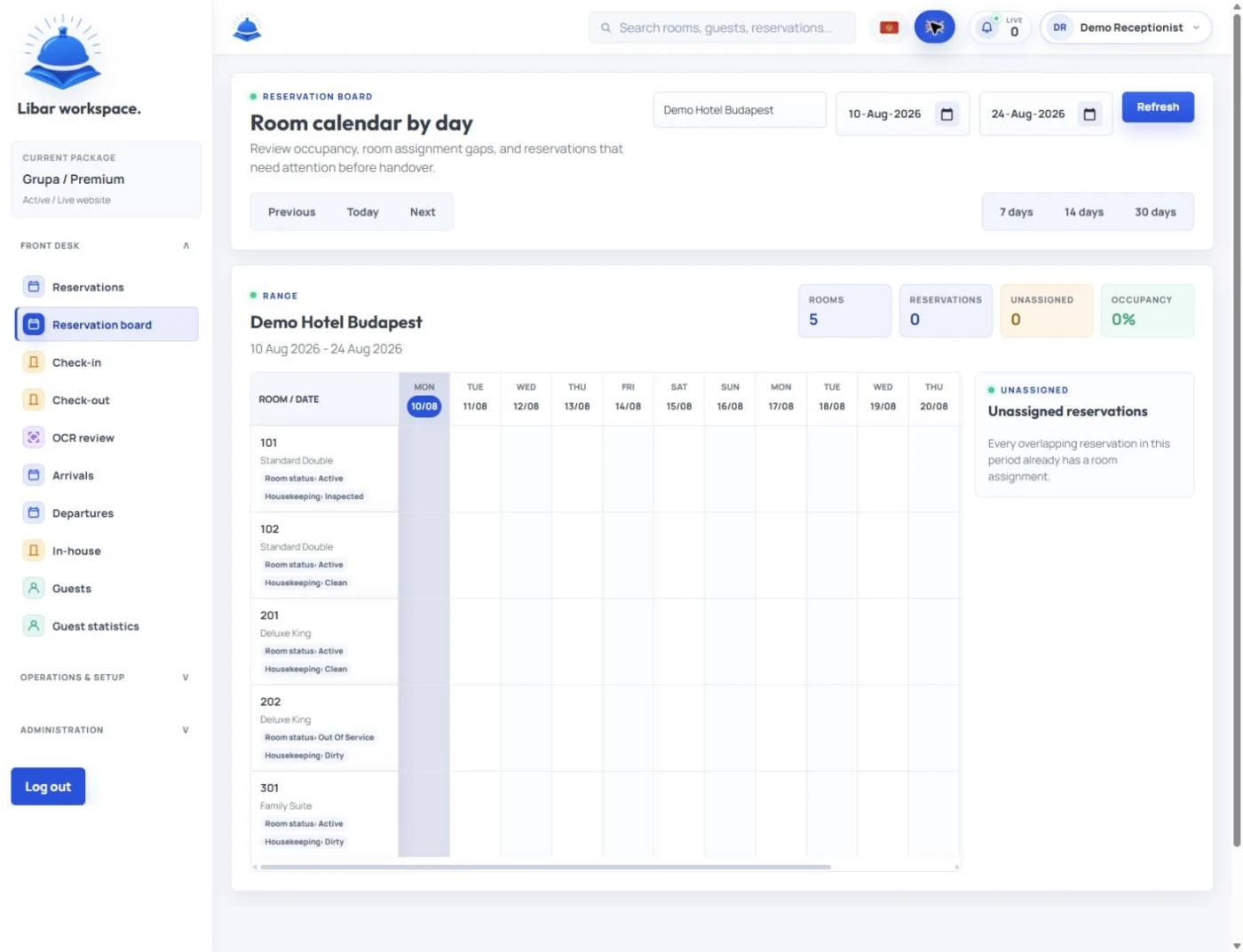
Use clear status labels.
| Room status | Meaning |
|---|---|
| Dirty | Guest departed, room not cleaned |
| Cleaning | Housekeeping is working |
| Clean | Room cleaned but not inspected |
| Inspected | Room checked and ready for guest |
| Occupied | Guest still in room |
| Late checkout | Guest approved to leave later |
| Blocked | Room held for internal reason |
| Out of service | Room cannot be sold |
| Maintenance pending | Room needs repair check |
The most useful status is “inspected.” It tells reception that the room is not only cleaned, but ready to give to the guest.
Handle early check-in with a clear rule
Early check-in creates pressure because it sits between guest satisfaction and room readiness. Reception should never guess.
Use a simple rule:
Early check-in is possible only when the room is inspected, assigned, and approved for release.
This keeps the promise realistic.
It also protects housekeeping.
If the room is not ready, reception can still help the guest with luggage storage, parking information, local recommendations, or a realistic update time.
Example note:
“Room 112 requested early check-in. Room cleaning in progress. Inspection expected by 13:00. Guest waiting in lobby. Offer luggage storage and notify when inspected.”
Confirm late checkout before it affects the next arrival
Late checkout looks like a small request, but it can affect housekeeping, the next arrival, room assignment, and staff planning.
Reception should check:
- Guest room number
- Requested checkout time
- Next booking arrival time
- Housekeeping schedule
- Extra fee
- Manager approval
- Guest confirmation
Do not approve late checkout in isolation.
Check the next arrival first.
A good note looks like this:
“Room 204 requested late checkout until 13:00. Next arrival expected at 16:00. Housekeeping can clean by 14:30. Manager approved €20 fee.”
This gives the team context and prevents conflict later.
Track special requests before the guest arrives
Special requests should not stay hidden inside messages. They need clear ownership before arrival.
Common arrival requests include:
- Baby cot
- Extra towels
- Parking place
- Airport transfer
- Room preference
- Early check-in
- Late arrival
- Dietary note
- Accessibility need
- Local recommendation
- Celebration setup
Each request needs a guest, room, action, owner, and status.
Example:
“Room 108 requested baby cot. Housekeeping assigned. Place before 14:00. Reception to confirm before guest arrival.”
This format keeps the promise visible.
Guest messages need a daily review
Reception should review all guest messages before arrival and departure periods. This includes WhatsApp, email, OTA messages, phone notes, and internal comments.
Messages often contain operational tasks.
They are not just communication.
A guest asking about parking may only need an answer. A guest asking for late checkout creates a room-planning task. A guest requesting a baby cot creates a housekeeping task. A guest asking for an invoice creates a billing task.
The rule is clear: if the message needs action, move it into the reception workflow.
This is where a reception system like Libar can help. It gives the team a shared place for guest notes, tasks, room status, handovers, folios, invoices, and daily work, instead of leaving important details buried in scattered messages.
Documents should not slow down check-in
Check-in becomes slower when document rules are unclear. Reception should prepare the document process before the arrival wave starts.
Check:
- Which guests still need ID or passport
- Which reservations need full guest registration
- Which guests arrive through OTA channels
- Which guests may arrive late
- Which documents or data need manager review
- Which local reporting rules apply to the property
Keep the guest-facing message simple:
“Please bring a valid ID or passport for registration at check-in.”
Do not overcomplicate the message.
Reception can handle details on site.
Create a clean arrival desk setup
A checklist is not only digital. The physical reception space also matters.
Before arrivals, prepare:
- Key cards or keys
- Printed forms if needed
- Payment terminal
- Invoice access
- Room assignment list
- Arrival notes
- Parking information
- Wi-Fi details
- Local recommendation sheet
- Emergency contact information
This saves seconds with every guest. During peak arrival time, those seconds turn into a calmer queue.
Use a simple arrival checklist for each guest
Each arrival should pass through the same flow.
| Step | Reception action |
|---|---|
| 1 | Welcome guest and confirm name |
| 2 | Check reservation and room assignment |
| 3 | Confirm room status is inspected |
| 4 | Collect or confirm documents |
| 5 | Confirm payment or deposit |
| 6 | Review special requests |
| 7 | Explain breakfast, Wi-Fi, parking, and checkout |
| 8 | Give key or access instruction |
| 9 | Mark guest as checked in |
| 10 | Add any new guest note or task |
This flow keeps check-in consistent. It also helps new staff learn faster.
Use a simple departure checklist for each guest
Each departure should also follow one clean flow.
| Step | Reception action |
|---|---|
| 1 | Confirm room number and guest name |
| 2 | Review open balance |
| 3 | Confirm extras and city tax |
| 4 | Prepare invoice or receipt |
| 5 | Take payment if needed |
| 6 | Ask about stay feedback |
| 7 | Confirm luggage or transfer request |
| 8 | Mark guest as checked out |
| 9 | Notify housekeeping |
| 10 | Add follow-up note if needed |
Checkout should feel smooth, not rushed. The guest’s final impression matters.
Keep housekeeping updates close to reception
Arrivals and departures depend on housekeeping. If housekeeping updates room status late, reception loses control of the day.
Set clear update moments:
- After first departures
- When cleaning starts
- When cleaning finishes
- After inspection
- When maintenance blocks a room
- When a room becomes ready
- Before early check-in approval
- Before final arrival wave
Reception and housekeeping do not need long meetings. They need fast, shared updates.
Maintenance issues must affect room planning immediately
Maintenance notes should never sit outside room planning. A room with a broken AC, water issue, lock problem, smell, noise, or damaged item may need to stay blocked until checked.
Track:
- Room number
- Issue
- Time reported
- Who reported it
- Owner
- Urgency
- Can the room be sold
- Next inspection time
- Final status
Do not assign a room with an unresolved issue unless a manager approves it. The short-term gain can create a bigger guest problem later.
The manager should review the risk list daily
A manager does not need to control every reception detail. But they should review the risk list every day.
The risk list includes:
- Rooms not ready close to arrival time
- Guests with complaints
- VIP or repeat guests
- Open balances
- Refunds
- Late checkout conflicts
- Maintenance blocks
- Missing documents
- Unanswered guest messages
- Staff handover gaps
This review helps the manager spot problems before guests do.
Paper checklists work until the pace gets too fast
Paper checklists can help a small team build discipline. They are useful for training and for simple days.
But paper has limits.
It does not update in real time.
If housekeeping changes a room status, the paper list may stay wrong. If a guest sends a WhatsApp request, the task may not reach the shift handover. If a manager approves late checkout from another location, reception may miss the update.
A digital reception workflow works better when the hotel has more rooms, more staff, higher occupancy, or more guest messages.
Small hotels need practical software, not complexity
Small hotels do not need a heavy system that slows the desk. They need a daily operating layer that matches real hotel work.
That means:
- Arrivals
- Departures
- Room status
- Guest notes
- Tasks
- Payments
- Folios
- Invoices
- Maintenance
- Handover
- Reports
Libar fits this part of the hotel workflow because it helps reception and property teams manage daily operations from one shared place. The value is not only data storage. The value is fewer missed details during busy hours.
Montenegro and seasonal hotels need tighter daily routines
Seasonal hotels on the Adriatic coast often face sharp daily pressure. A quiet morning can become a fast changeover day with early departures, late checkouts, airport transfers, multilingual guests, and rooms that must turn quickly.
That is where a daily checklist matters most.
It gives the team rhythm.
Small hotels, villas, and apartments in Montenegro often work with lean teams during peak season. Reception may need to manage check-in, checkout, guest messages, owner updates, local recommendations, and payment notes at the same time.
A strong checklist does not remove pressure. It makes the pressure easier to manage.
Daily reception checklist template
Use this template at the start of every day.
Date and shift
Date:
Receptionist:
Manager on duty:
Housekeeping lead:
Expected arrivals:
Expected departures:
Occupancy today:
Departures
Room:
Guest name:
Checkout time:
Open balance:
Invoice needed:
Extras to confirm:
Luggage or transfer:
Room inspection status:
Follow-up:
Arrivals
Room:
Guest name:
Arrival time:
Booking source:
Payment status:
Documents needed:
Special request:
Parking note:
Room status:
Check-in note:
Room status
Room:
Current status:
Housekeeping owner:
Inspection needed:
Maintenance issue:
Ready time:
Blocked: yes/no
Guest requests
Guest/room:
Request:
Owner:
Deadline:
Status:
Manager approval needed: yes/no
Payments and invoices
Guest/room:
Open balance:
Deposit:
Refund:
Invoice type:
Company details:
Payment note:
Messages
Guest/room:
Channel:
Message summary:
Action needed:
Owner:
Status:
Handover notes
Unfinished item:
Guest risk:
Room risk:
Payment risk:
Manager note:
Next action:
Example daily reception note
Date: 22 July
Expected departures: 14
Expected arrivals: 18
Manager: Jelena
Housekeeping lead: Ana
Room 204 requested late checkout until 13:00. Next arrival expected at 16:00. Housekeeping can clean by 14:30. Manager approved €20 fee.
Room 108 arrival at 15:00 requested baby cot and parking. Housekeeping assigned baby cot. Reception to confirm parking space before 13:00.
Room 302 has open balance of €84 for transfer. Guest asked for company invoice. Confirm company details before checkout.
Room 305 has AC noise reported. Maintenance will test after 12:00. Keep room blocked until final status.
This note gives the team a clear daily picture. It shows what matters before the pressure starts.
A daily hotel reception checklist gives small hotels a calmer way to manage changeover hours. It protects guest experience, room readiness, payments, invoices, tasks, and team responsibility.
Start with a simple checklist. Use it every day. Improve it after each busy period. When the pace grows beyond paper, Libar can help reception keep arrivals, departures, room status, tasks, guest notes, folios, invoices, and handovers in one shared workflow.